Contact Us

If you still have questions or prefer to get help directly from an agent, please submit a request.
We’ll get back to you as soon as possible.

Please fill out the contact form below and we will reply as soon as possible.

  • Contact Us
Spanish
HR Croatian
PL Polish
DE German
US English (US)
ES Spanish
MX Spanish (Mexico)
  • Home
  • GSX

¿Cómo resuelvo los errores de "KGB Device Identifier" al crear reparaciones de GSX?

Este artículo es una guía paso a paso para resolver errores que puedes encontrar al crear GSX reparaciones en Fixably.

Written by Annukka Matilainen

Updated at October 29th, 2026

Contact Us

If you still have questions or prefer to get help directly from an agent, please submit a request.
We’ll get back to you as soon as possible.

Please fill out the contact form below and we will reply as soon as possible.

  • Empezando
    Descripción general Cómo hacerlo
  • Notas de la versión
    Lanzamientos de 2026
  • Gestión de pedidos
    Guías prácticas para pedidos Edición por lotes Listas de pedidos Usando archivos Estimaciones de costos
  • Funciones recién lanzadas
    Noticias importantes Cinturón negro360 Roles y permisos Nuevas funciones
  • Gestión de empleados
  • Gestión de clientes
    Agregar y eliminar clientes Comunicarse con los clientes Privacidad de datos
  • Portal del cliente
  • Automatizaciones
  • Gestión de stock
    Agregar y recibir productos Gestión de inventario Resolución de errores de stock
  • Facturación
  • Informes
    Informes estándar Informes integrados y personalizados Informes avanzados
  • Campos personalizados
  • Integraciones
    Envío y transporte Finanzas Inicio de sesión único (SSO) Integraciones de pago API para desarrolladores Fixably Contabilidad Xero WhatsApp Business
  • GSX
    Integración GSX Creando reparaciones Gestión de reparaciones Preguntas frecuentes Devoluciones de piezas
  • Listas de precios
  • Envíos
  • Contratos de servicios
  • Configurando su entorno
    Configuración del sistema Configuración de correo electrónico Importación de datos Seguridad
  • Solicitudes de piezas
  • Asignación de piezas entrantes
  • Reserva de citas
+ More

1. Navega hasta el pedido correcto.

2. Haz clic en el número de parte y luego en Editar. 
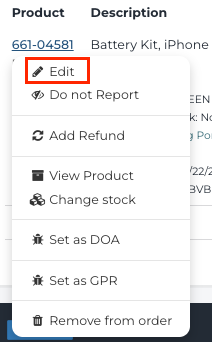
 

3. Para el stock de Consignación, Apple requiere que el KGB se complete antes de crear la reparación. Completa esta información con el stock de Consignación que estás utilizando y haz clic en Guardar cambios. 

 

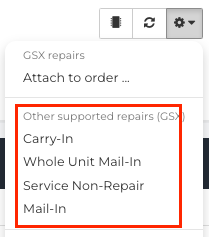
4. Haz clic en el engranaje en la tarjeta del dispositivo y luego en el tipo de reparación que estás intentando crear y esto debería permitirte crear la reparación utilizando el stock de Consignación. 


kgb reparaciones gsx

Was this article helpful?

Yes
No
Give feedback about this article

Related Articles

  • ¿Cómo configuro la integración de Apple GSX?
  • ¿Cómo resuelvo el Error 400 de GSX?
  • ¿Cómo resuelvo los errores de Error 401 "Técnico No Certificado" al crear reparaciones de GSX?
  • ¿Cómo resuelvo los errores "Límite de Búsqueda Excedido" al usar la GSX Integration?
Get started today and start fixing hardware with software
Thank you! We will contact you shortly.
Oops! Something went wrong while submitting the form.
ProductsFixably RepairFixably RefurbFixably Depot
SolutionsAASPsEnterprise ServiceRefurbishersMulti-Brand Repairs
ResourcesAll ResourcesCustomer StoriesBlog
CompanyAbout UsCareers
Follow UsFacebookInstagramTwitterLinkedIn

Contact Us

sales@fixably.comsupport@fixably.com
Fixably RepairRepair ManagementGSX IntegrationInventory & StockCustomer ExperienceReporting & DataPoint of SaleFixably Paperless

North America  Sales

+1 888 305 401220289 Stevens Creek Blvd #1070
Cupertino, CA 95014
United States

Europe  Sales

+358 9 424 51149Kaisaniemenkatu 7
00100 Helsinki
Finland

Contact Us

sales@fixably.comsupport@fixably.com
Copyright © Fixably Ltd.Privacy PolicyTerms of ServiceData Processing Agreement

Copyright 2026 – Fixably.

Knowledge Base Software powered by Helpjuice

Expand