Contact Us

If you still have questions or prefer to get help directly from an agent, please submit a request.
We’ll get back to you as soon as possible.

Please fill out the contact form below and we will reply as soon as possible.

    English (US)
    HR Croatian
    PL Polish
    DE German
    US English (US)
    ES Spanish
    MX Spanish (Mexico)
    • Home
    • Integrations
    • GSX
    • Managing Repairs

    Why are changes made in GSX not showing up in my Order?

    GSX repair statuses, parts and pricing information may need to be refreshed in Fixably.

    Written by Annukka Matilainen

    Updated at May 19th, 2026

    Contact Us

    If you still have questions or prefer to get help directly from an agent, please submit a request.
    We’ll get back to you as soon as possible.

    Please fill out the contact form below and we will reply as soon as possible.

    • Release Notes
      2026 Releases 2025 Releases 2024 Releases
    • Getting Started
      Configuring Your Environment
    • Order Management
      Orders How-To Guides Batch Edit Order Lists Using Files Cost Estimates Appointment Booking Customer Portal
    • Stock Management
      Products and pricing Troubleshooting Part Requests Managing Inventory Purchasing and receiving Returns
    • Invoicing
    • Reporting
      Report Builder
    • Integrations
      Shipping and Transportation Finance Single Sign-on (SSO) Payment Integrations Fixably API Blackbelt360 Xero Accounting WhatsApp Business GSX
    • Service Contracts
    • Settings & Configuration
      Roles & Permissions Automations Custom Fields Employee Management Customer Management System Settings Email and SMS Setup Importing Data Security
    • Shipping & Logistics
      Manifests
    + More

    Follow the steps below to sync information between Fixably and GSX.

    1. Navigate to the appropriate Order.


    2. Beside the Repair Number, click on the GSX Dispatch ID.
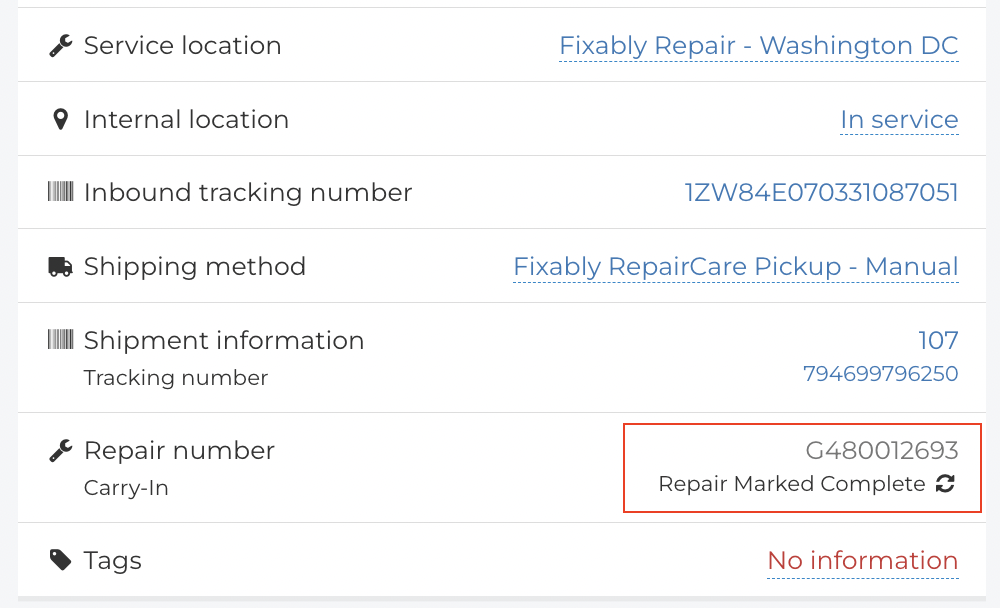


    3. If there is a mismatch between GSX and Fixably, this step will synchronize the information.

       
    4. In some cases, you may also need to refresh your browser window.


    updates not visible gsx order changes aasp apple faq gsx sync

    Was this article helpful?

    Yes
    No
    Give feedback about this article

    Related Articles

    • How do I change which Customer is attached to an Order?
    • Is it possible to change the Fixably Order number format?
    • How can Fixably automatically close Orders based on specific criteria?
    • How do I manage Apple repairs from within an Order?
    Get started today and start fixing hardware with software
    Thank you! We will contact you shortly.
    Oops! Something went wrong while submitting the form.
    ProductsFixably RepairFixably Depot
    SolutionsAASPsEnterprise ServiceRefurbishersMulti-Brand Repairs
    ResourcesAll ResourcesCustomer StoriesBlog
    CompanyAbout UsCareers
    Follow UsFacebookInstagramTwitterLinkedIn

    Contact Us

    sales@fixably.comsupport@fixably.com
    Fixably RepairRepair ManagementGSX IntegrationInventory & StockCustomer ExperienceReporting & DataPoint of SaleFixably Paperless

    North America  Sales

    +1 888 3600 63920289 Stevens Creek Blvd #1070
    Cupertino, CA 95014
    United States

    Europe  Sales

    +358 45 4900 549Kansakoulukatu 3
    00100 Helsinki
    Finland

    Contact Us

    sales@fixably.comsupport@fixably.com
    Copyright © Fixably Ltd.Privacy PolicyTerms of ServiceData Processing Agreement

    Copyright 2026 – Fixably.

    Knowledge Base Software powered by Helpjuice

    Expand